
The ordering system that remembers everything, so you don't have to guess
Every order, every change, every void — timestamped, logged the instant it happens, and tied to the login behind it. Not at checkout. Not at close. The moment it occurs. Nothing vanishes quietly, because nothing's built to let it.
Every line here is
permanent the
second it's written
This updates itself in real time, the same way your own ledger will. The instant something happens, it's on record — and after that, nothing can edit it or delete it. Not a correction. Not a cleanup. Just what actually happened, kept exactly as it happened.
You can view the ledger dashboard here →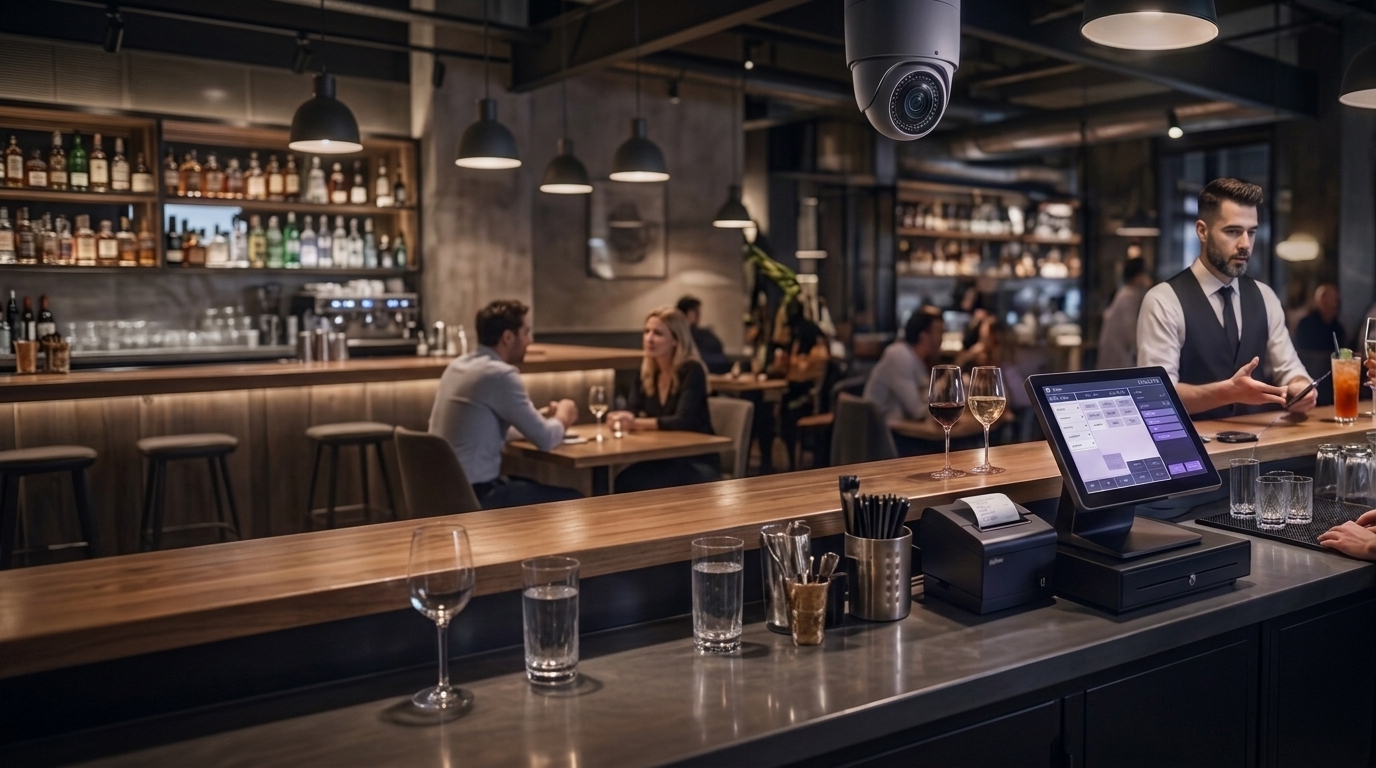
Most POS systems forget the instant it happened
Here's why: most systems only write to their record when an order is placed, or when it's paid. Everything before that — an item added and then quietly removed, a price changed and changed back, a table built up and abandoned — never touches the database at all. It just isn't there. Not hidden, not deleted. Never recorded in the first place.
So you're left staring at a report that balances, technically, while the number underneath it doesn't feel right. No single line to point at. No moment to check against. Just a gap between what the till says and what you know the shift should have made — nothing checked in real time, nothing ever escalated for a human to review.
Not a rare failure. Just the default most POS systems ship with.
KEEP closes
that gap
Every added item, every change, every void — logged the instant it happens, not at checkout, not at close. If an item gets swapped for something else mid-order, the original stays on record, struck through, not erased. Voiding works the same way: any login can void a line on the spot, no waiting on anyone — but it never disappears, it's struck through and kept, and the moment it happens, a manager or owner is alerted. Either way, it's on record before anyone even sees it.
Who was logged in. What changed. When. All of it, kept — automatically, the moment it happens.
The keep was never the whole castle. It was the last line that held
The name isn't decoration. The keep was the strongest part of any fortress — not the gate, not the wall, the piece built to hold when the pressure's highest and the pace is fastest. That's the job here: not to stop every kind of loss, but to be the part that doesn't give when everything else moves too fast to catch.
Every POS action gets cross-checked against what the camera actually saw happen at the till, in real time, and escalated for human review. Ghost tickets — an order taken, never entered — are the hardest to catch, because even KEEP's ledger has nothing to check against. That's where POS Guardian earns its KEEP.
Live, during every shift, the camera and the POS are quietly compared against each other. Most of the time they agree — a customer orders, it's rung up, that's the end of it. When they don't agree, that's a moment worth a second look. It doesn't get reported or decided on the spot. It gets set aside for a person to actually review and write up, before the owner or GM ever sees it.
AI flags a moment. A human decides.
Detection quality is only as good as camera coverage. If the camera can't see the whole till area, the AI can only flag what's actually inside its field of view — a partially blocked or badly angled camera means partially blocked detection, no way around it. Coverage gets checked at setup for exactly this reason. Audio adds an independent second layer — transcribing and flagging approved keywords even in moments a camera's view is obstructed — but it supports full coverage, it doesn't replace it.
Voids — instant, logged, alerted
Any login can void a line right away — no approval needed. It's logged immutably, attributed to whoever did it, and pushed to Manager/Owner the instant it happens.
Keeps logging through a dropped connection
Every action records offline the instant it happens, then syncs back the moment coverage returns — nothing lost, all kept.
AI-powered monitoring, live
Every POS action cross-checked against camera detection in real time, with human review before anything reaches you.
Hard-coded venue QR
One PromptPay number, set once, locked to the account. No device can change it, no other QR code works at any of your terminals, and any attempt triggers an instant owner-level alert.
AI-powered Advanced Inventory
Every menu item can carry a real recipe — ingredients deduct automatically the moment it's paid for, with an instant alert when something runs low. Standard on every tier, not a paid bolt-on.
Set up once. It runs itself after that
Tell us about your venue
Table count, zones, and your PromptPay number — the basics for your floor. A short setup flow, not a technical install.
Staff get logins
Each staff member gets an OP-ID (never shared) and a fallback PIN for backup. No hardware to configure per person.
QR gets locked
Your PromptPay number gets fixed to the account during setup and stays that way — no device can swap it out later.
Go live
Orders, voids, changes — everything starts logging from the first ticket. Nothing to turn on later.
Hassle free setup
Setup's pretty painless. There's a menu builder if you want it, but you don't have to build anything from scratch — export your menu as a CSV (recommended, fastest way to get it right) or just take a photo if your menu's small. And if anything gets confusing, support's one tap away.
The gap a POS alone can never see
This is the main default problem with every POS system — not a KEEP problem, not a camera problem, and not something switching to another POS fixes either. The main problem is that there's only ever been half the picture to look at. So we built the other half.
Served, never rung up
A drink leaves the pass — hand movement at the till — but nothing gets entered into the POS. No ticket, no line item, nothing on KEEP's side at all. Nowhere for it to ever surface, no matter how good the reporting is.
Camera meets the gap
Camera picks up the serve. Cross-referenced against the lack of POS activity in that window — a served item with no matching order is the pattern that never shows up in any report until the shift's already over and the money's gone.
Human reviews, every time
Goes to the Reviewer Desk first, escalates to the Supervisor Desk next. Anything scoring 99+ risk goes straight to the Owner dashboard. Never an automatic accusation, never a lockout — a person looks at it, every single time.
The table flags itself before anyone has to ask
Nothing sits quietly waiting for someone to notice. Every flag just states what happened — so the whole team can see it and assist.
A ticket built but never placed is an order delayed
Items get tapped in, the server gets pulled to the bar, and PLACE ORDER never happens. The kitchen never hears about it; the guest waits for food that was never ordered. KEEP flags that table after 3 minutes until someone fires it or clears it.
Voiding is instant. Hiding it isn't possible.
Any login can void a line — with a reason, and a warning that it's being logged.* The original never leaves the ticket, struck through, not erased, and Manager or Owner is alerted the moment it happens. The takings and the wastage both add up at the end of the night, no matter who did it.
You decide how visible this is
People behave differently when they know they're being watched — that's not a guess, it's one of the best-documented findings in loss prevention. That's what Open mode does: staff see the warning, know the rules, and the deterrent does its job before a single void needs a second look. It suits a venue that wants everyone starting from the same page from day one — nothing hidden, nothing to guess at. And it gives the owner the same peace of mind: less wondering what's actually happening on the floor.
Discreet mode is for something else entirely — the feeling you've probably already had, even if you never said it out loud: numbers that don't quite add up, a shift that just feels off, nothing you could point to yet. That feeling is real, not paranoia — it's usually the first thing an owner notices, long before any report catches it. Discreet mode doesn't tip anyone off. You still get alerted — a full report, with the camera cue, POS timestamps, and every ticket already attached, checked twice by a real reviewer before it ever reaches you.
Staff see this warning before voiding.
Hidden — the full-ticket evidence trail is the only record.
Security is the floor, not the upsell
Every tier includes the immutable ledgerImmutable — something permanent and absolute that cannot be changed over time. [1] — meaning every action gets written the instant it happens, and there's no way to edit or delete it afterward — manager-gated discounts, voids that alert the moment they happen, and the hard-coded QR lock. What changes between tiers is scale and complexity — not how protected you are. We even throw in a free Owner/GM Android app.
Each venue keeps its own floor, staff, and ledger, under one manager app that covers every site.
All tiers: immutable ledgerImmutable — a fundamental constant that remains completely invariant under transformations. [3] · manager-gated voids & discounts · QR lock · offline logging, per device · Owner/GM push notifications, free on every tier.
What staff and owners actually see
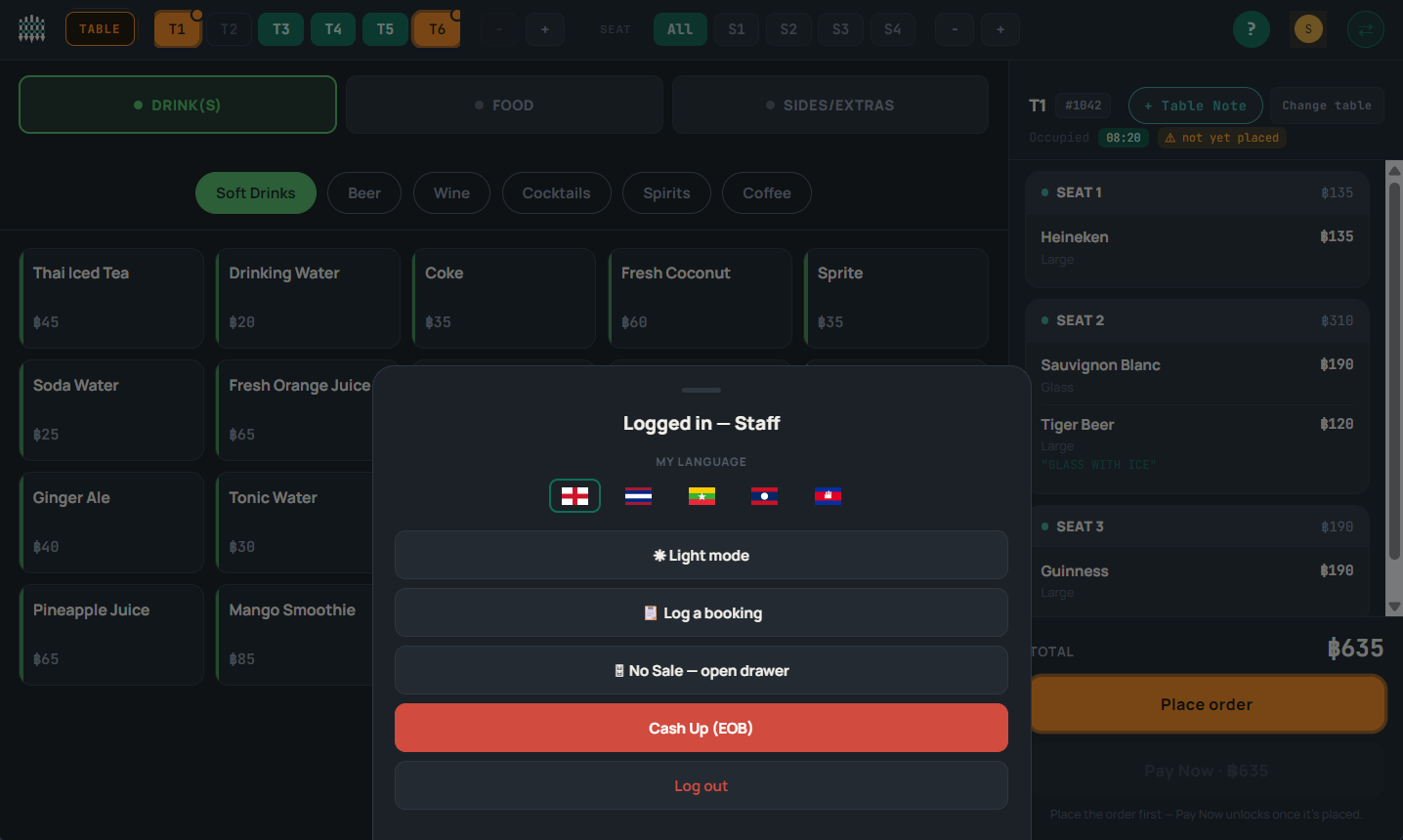
Staff tools built in — language switcher, log a booking, no-sale drawer open, and end-of-day cash up, all from the till.
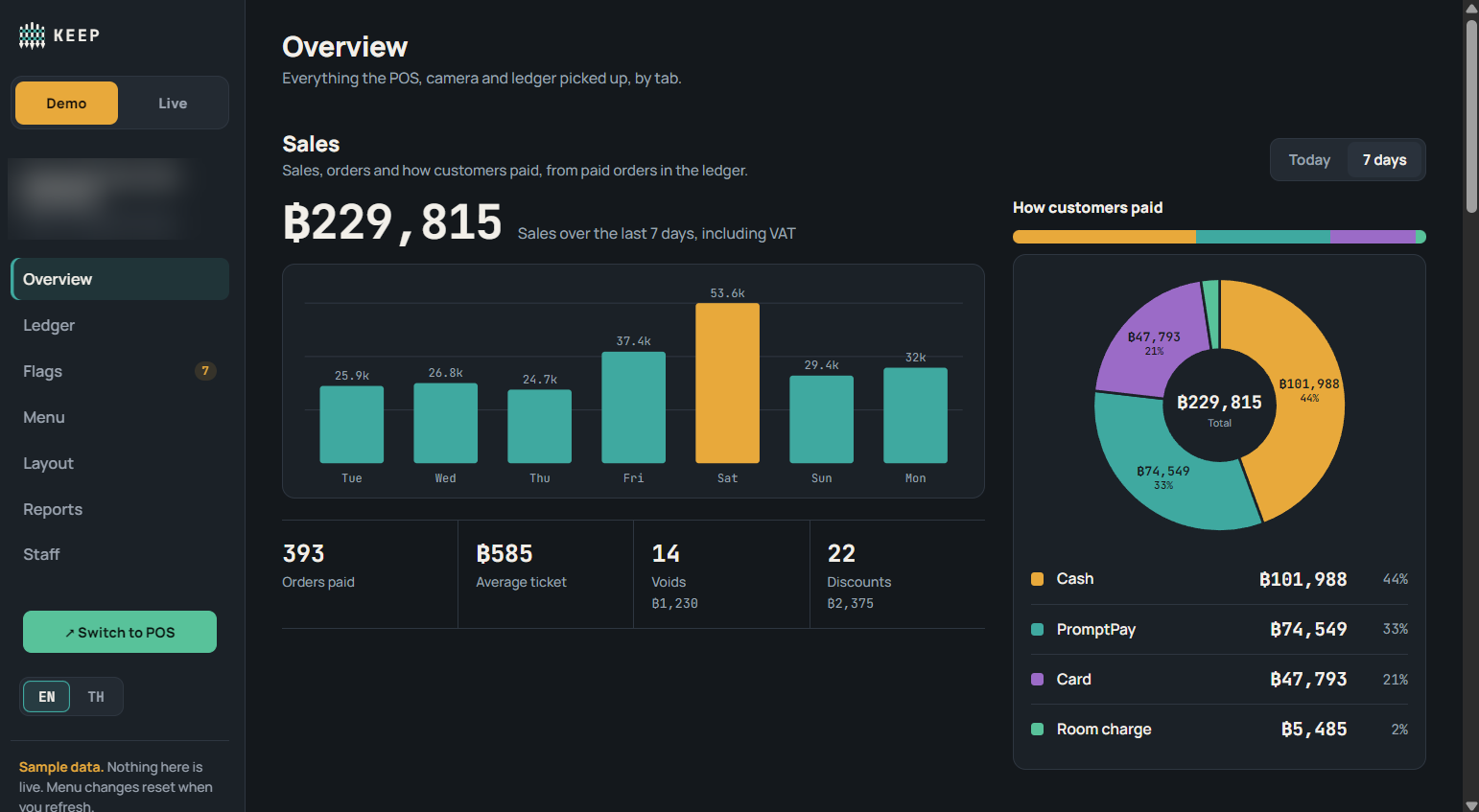
Sales by day, voids, discounts, and how customers paid — the whole week, from the ledger, not a guess.
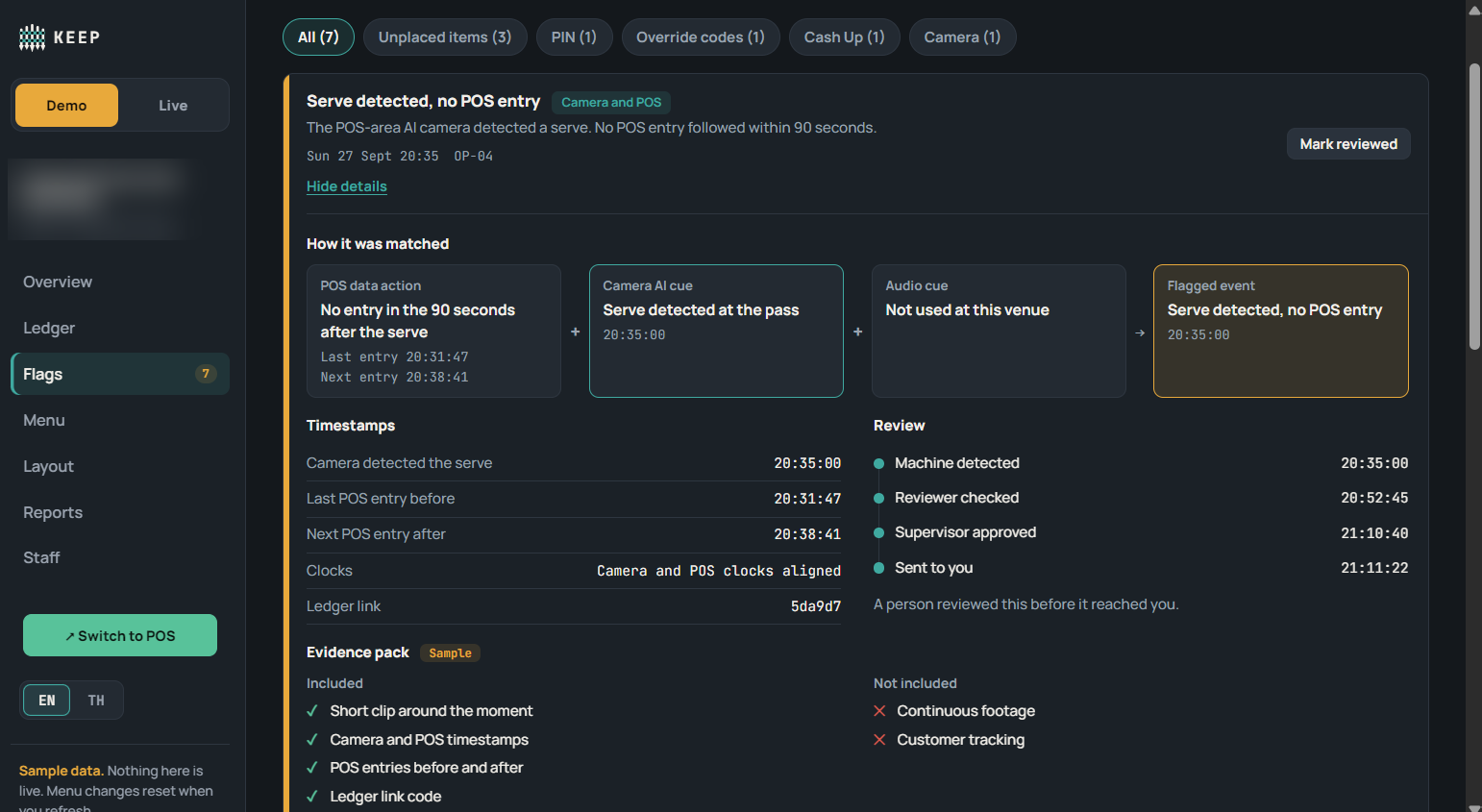
Every flag comes with its evidence — the camera cue, the POS timestamps either side, and who reviewed it before it reached you.
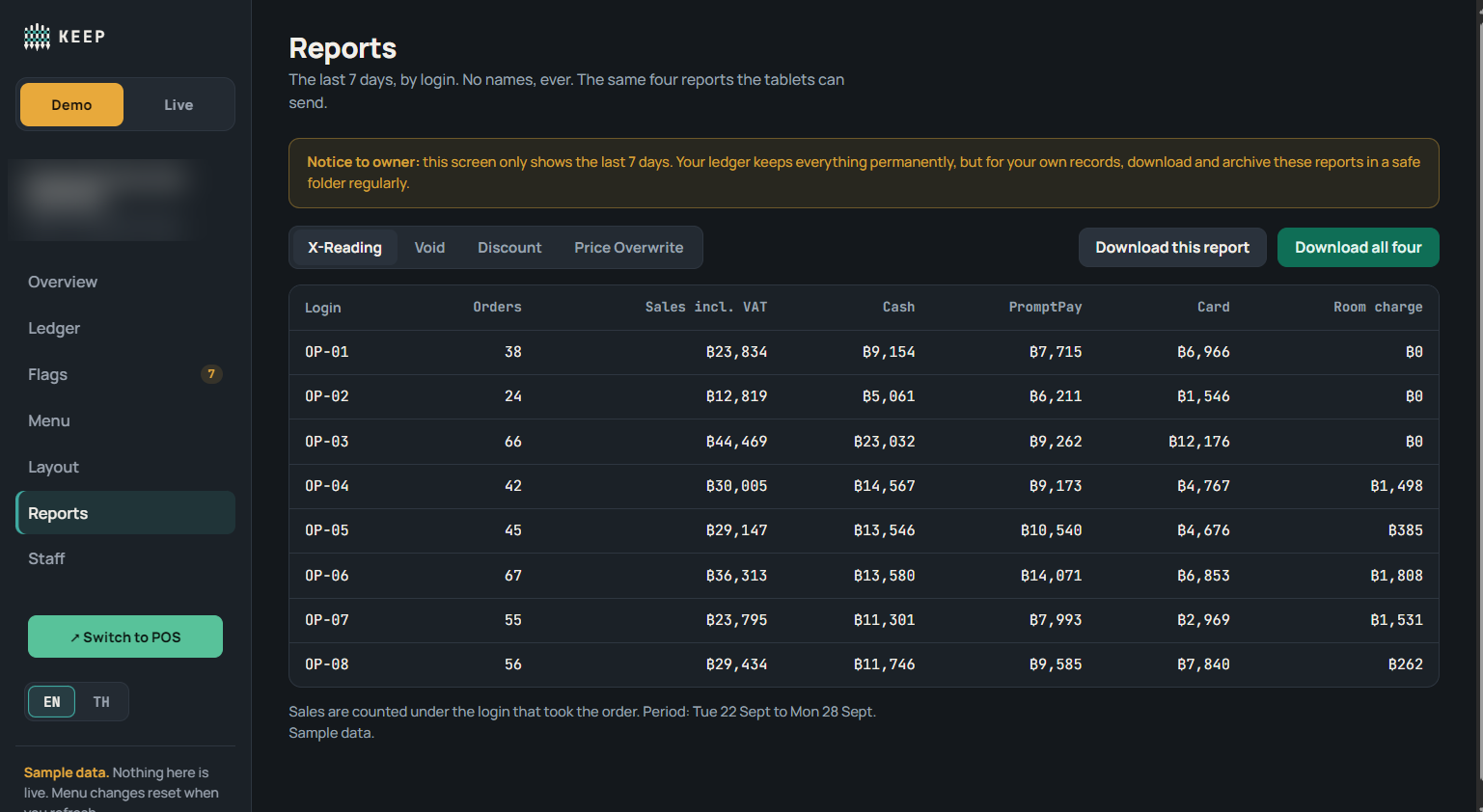
X-Reading, Void, Discount, Price Overwrite — the same four reports the tablets can send, broken down by login.
Questions worth asking before you switch
That's not a bug in whatever you're using now — it's the default. Most systems are built to log a sale, not the activity around it, so corrections, cancelled orders, and abandoned tables never make it into any database at all. Switching to another system built the same way won't close that gap — it's structural, not a missing feature. KEEP's ledger works differently: every action is written down as it happens, attributed to whoever did it, not just the final sale.
Honestly, on its own, it doesn't fully — that's the one real gap KEEP's ledger can't close alone. Under-ringing happens when something never gets entered into the POS at all, so there's nothing for the ledger to record in the first place. That's specifically what the camera catches: it's not reading the till, it's watching what actually happens at it, so an order that should exist but doesn't shows up as a gap between the two records. The two work together — KEEP proves what's on the record, POS Guardian catches what never made it there.
Almost none of it falls on you. Setting up a POS is usually miserable — days of fiddling with menus, printers, permissions. KEEP works the other way round: you answer a short set of questions about your venue — table count, zones, PromptPay — and KEEP builds your setup from those answers. Adding your menu is just as simple: a clear photo, a scan, or an exported spreadsheet, whichever's easiest for you — we rebuild it into KEEP from there. Setup support's included on top of that. The sweat's on our side, not yours.
Single tablet is KEEP's simplest setup — no multi-zone layout, no extra hardware, nothing to wait on. You answer the venue questionnaire, send your menu (photo, scan, or spreadsheet), we handle the build, PromptPay gets locked, you're live.
Each staff member gets their own OP-ID — never shared — plus a fallback PIN as backup. You create and assign these yourself as part of setup, no technical config or per-person hardware needed.
No — that's deliberately not how it's built. Any login can void, on the spot — no waiting on a manager, no finger-pointing between shifts. But nothing is ever silent: it's logged permanently, attributed to whoever did it, and flagged to management the instant it happens. Staff know that up front, which is the point — the honest ones stop worrying about who gets blamed, because the record settles it either way.
Loyverse — one of the most popular POS systems in Thailand — charges about ฿800/month per store just for its employee-management add-on (access rights, sales-by-employee tracking) — numbers on what the POS was told, not a check on whether any of it's true. KEEP's ฿690/month includes real protection built in from day one, not bolted on as an extra. Every tier also gets Owner/GM push notifications through our Android app — real-time alerts on voids, flags, and cash-up — plus as many staff OP-IDs as your team needs, no per-head charge.
Because off-the-shelf systems are built to record transactions, not activity. Most only write to the database once an order's placed or paid — everything that happens before that point stays off the books entirely. KEEP was built the other way round: every action logged the instant it happens, not at checkout.
What POS Guardian needed wasn't out there — a live, tamper-proof feed of exactly what happened at the till for its cameras to check against. One system had the data but no way out (no API, no webhooks). Another had exports but no real-time reporting. Another had reporting but nothing underneath it. Every system had a piece. None had the whole thing. So we built it.
It's deleted automatically — no copy of your ledger or menu sitting on a server after you're gone. If you want your records for your own files, pull an export before you close the account; once it's closed, there's nothing left to recover.
Depends on the tier. Tier 1 runs on a single tablet, nothing else required. Tier 2 adds a tablet per terminal once you've got multiple zones running. Tier 3 adds the hardware for POS Guardian — a small router-sized box we install on-site, plus a camera. Use your own if you've already got one, or we'll install one for you. No proprietary devices otherwise — standard tablets, your pick of make.
Yes — that's Tier 3. Each venue keeps its own floor, staff, and ledger, but they all sit under one manager app that covers every site, so it's not a separate login per venue.
Everything's encrypted in transit and at rest. Each venue's data is isolated — there's no cross-venue visibility, even across your own sites. Access is role-gated the same way the POS itself is: Staff, Manager, Owner see different slices, and nothing's visible without a login tied to that tier.
Honestly — the POS protects the money that gets entered into it. It can't catch money that was never going to touch it: cash taken and never rung up, a personal QR shown at the table, an order taken and never entered. That's specifically what a camera catches, and it's exactly where real losses tend to hide. They're separate products though — each works fine alone. Together, they just cover more ground: KEEP logs what happened on the till, POS Guardian adds the camera's side of it.
It cross-references two things: what the POS recorded, and what the camera saw happen at the till in that same window. When something doesn't match — a drink served with no order behind it, for example — it gets flagged and sent to the Reviewer Desk. If it looks real, it escalates to the Supervisor Desk. Anything scoring 99+ risk goes straight to the Owner dashboard. Nothing reaches an Owner unless it's been confirmed by a person — not just suspected by the AI.
No. Face-matching only happens at staff login, checking the person logged in is who they claim to be. Everything else — till area, kitchen pass — is presence and motion only. No customer identification, ever.
That's your call, venue by venue. It supports both an open mode (visible, meant to be a known deterrent) and a discreet mode (unexplained by design — not secrecy for its own sake, but there's no map to game if staff don't know exactly what triggers a review). Face-matching itself only ever happens at login, checking the person logged in is who they claim to be — never continuous, never customer-facing.
No visible signal at all — no warning on the till, no announced camera. Just the evidence (POS timestamps, camera cue, every ticket) doing the work quietly in the background. The alternative, Open mode, is a known, visible deterrent instead. Both are real settings, switched per venue from the Owner Dashboard.
Then detection quality drops with it — this isn't optional. The AI doing the actual seeing can only flag what's inside its field of view. A partially blocked or badly angled camera means partially blocked detection, plain and simple. Camera placement gets checked at setup specifically so the whole till area is actually covered, not just glanced at. Audio adds an independent second layer — but it's a support, not a replacement for real coverage.
No. A flag just means a person reviews it before anyone else sees anything. No automatic accusation, no automatic lockout, ever.